Last reviewed: June 29, 2026
GuardPick snapshot
The short version
Android is not as open to attack as Windows, but it is more exposed than iOS. The real risk is sideloaded apps, phishing links, and low-quality apps that slip through Play Store review.
- Best for
- Android users who sideload APKs, travel frequently and use public Wi-Fi, or want app-level lock and anti-theft features their phone doesn't include.
- Avoid if
- You only install apps from the Play Store, keep Android updated, and have careful link-clicking habits. Google Play Protect covers the baseline.
- Main tradeoff
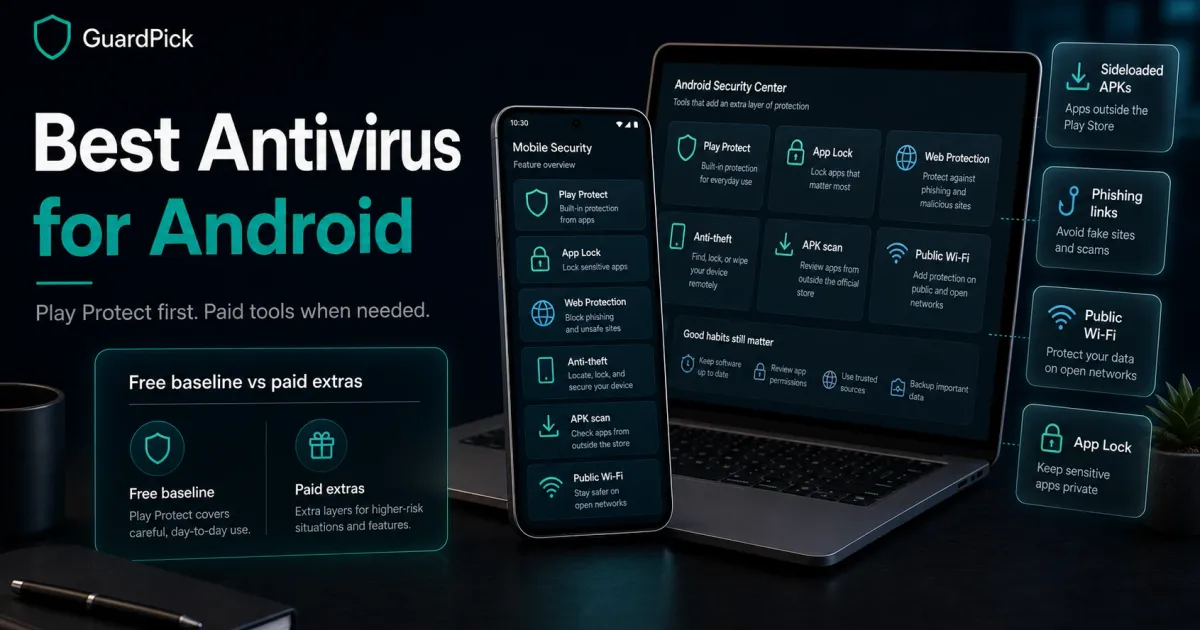
- Play Protect is free and improving. Paid antivirus adds phishing protection, VPN, and anti-theft rather than meaningfully better malware detection.
- Safer alternative
- Google Play Protect, already on your phone with no extra install needed.
Android security is more nuanced than Windows. The biggest real-world risks on Android are not traditional viruses. They are malicious apps that slip through review, phishing links in messaging apps, and sideloaded APKs from outside the Play Store.
Google Play Protect addresses the first of those. Paid antivirus adds the most value on the other two.
Quick picks
| Pick | Best for | Price |
|---|---|---|
| Bitdefender Mobile Security / Total Security | Best overall for Android | Varies by plan |
| Malwarebytes for Android | Lightweight, adware-focused | From ~$44.99/year |
| Google Play Protect | Free baseline for careful users | Free |
Best-list matrix
Quick pick matrix
Use this as a first-pass filter before comparing prices, renewals, and bundled extras.
Bitdefender Mobile Security
Check current priceBest for
Android users who want real-time protection, anti-theft, App Lock, and web filtering in a low-battery-impact package.
Why it fits
Strong independent-lab history for Android detection. Minimal battery drain. Autopilot mode. App Lock prevents unauthorized access to specific apps. Included in Bitdefender Total Security multi-device plans.
Watch out
Requires a separate subscription if not bundled with a multi-device plan. Check the Android-specific price before buying because the /go/ route may point to a broader Bitdefender plan.
Malwarebytes for Android
Check current priceBest for
Users who want adware and PUP protection without a heavy suite. Good as a second-opinion tool alongside Play Protect.
Why it fits
Light footprint. Focuses on adware, potentially unwanted programs, and ransomware. Less battery impact than full-suite alternatives. Trusted brand in the anti-malware space.
Watch out
Not a full antivirus replacement. Best used alongside Play Protect, not instead of it. Premium required for real-time protection.
What Google Play Protect covers (and what it doesn’t)
Play Protect scans apps when installed and periodically re-scans installed apps for newly identified threats. It also checks apps against Google’s known malware database before download. This covers:
- Known malware apps on the Play Store
- Apps that develop malicious behavior after initial approval
- Basic SMS and web threats on newer Android versions
What Play Protect does not cover well:
- Phishing links in browsers, email apps, and messaging apps
- Sideloaded APKs from outside the Play Store
- Adware and potentially unwanted programs in borderline-legitimate apps
- Anti-theft features like remote lock, locate, or wipe
Paid antivirus adds most of its value in these gaps.
Android security beyond antivirus
Practical checklist
What actually protects an Android phone
Most Android security comes from habits and settings, not antivirus software.
Do these first
- Keep Android and apps updated. Security patches matter more than any antivirus.
- Only install apps from the Google Play Store unless you have a specific reason to sideload.
- Review app permissions before granting them. Does a flashlight app need contacts access?
- Use a screen lock with biometrics or a strong PIN.
- Enable Find My Device for anti-theft before you need it.
- Use unique passwords per service. A password manager on Android helps.
Then consider paid antivirus if you
- Regularly sideload APKs from outside the Play Store.
- Use your phone for work email and sensitive accounts.
- Travel frequently and use unfamiliar Wi-Fi networks.
- Want App Lock to prevent unauthorized access to banking or messaging apps.
Pricing
| Plan | Devices | Year 1 | Renewal | |
|---|---|---|---|---|
| Bitdefender Total Security (includes Android) Best value | 5 devices | $19.99 | $89.99 | View deal → |
| Malwarebytes Premium (multi-platform) | 1 device | $44.99 | $59.99 | View deal → |
Google Play Protect is the free baseline and does not need a purchase link. It is already built into Android devices with Google services.
Who each option is for
Audience match
Match the pick to the person
The safest choice changes by habits, budget, and who manages the device.
Reader profile
Careful Android user, Play Store only
- Recommended choice
- Google Play Protect
- Why
- Already installed, covers known malware, no battery impact, no subscription.
- Avoid / watch out
- Does not cover phishing links or sideloaded APKs.
Reader profile
Android user who sideloads APKs
- Recommended choice
- Bitdefender Mobile Security
- Why
- Real-time protection covers threats outside Play Store review.
- Avoid / watch out
- Check renewal pricing if not bundled with a multi-device plan.
Reader profile
Multi-device household (Windows + Android)
- Recommended choice
- Bitdefender Total Security (multi-device)
- Why
- Cover Windows and Android on one plan. More cost-effective than separate subscriptions.
- Avoid / watch out
- Renewal jumps to $89.99 for Windows plan. Verify device slot count.
Editorial method
How this was checked
GuardPick reviews combine a real-world Windows user angle with source checks, pricing context, and safer alternatives. We are not an antivirus lab, and we do not treat affiliate payouts as a recommendation signal.
- 01
Real-world angle
We look at whether the product makes sense for normal Windows users, not only benchmark charts.
- 02
Independent research
When lab data is used, we name the source and date instead of repeating vague marketing claims.
- 03
Pricing check
Intro prices, renewal jumps, trial limits, and cancellation friction are part of the verdict.
- 04
Alternatives considered
Windows Defender and lower-cost options stay on the table when paid software is not necessary.
Related reading: Best antivirus software overall · Windows Defender vs paid antivirus