Last reviewed: June 29, 2026
GuardPick snapshot
The short version
This is the one category where the honest answer is: the product category is largely mislabeled. 'Antivirus for iPhone' does not mean what most people expect it to mean.
- Best for
- iPhone users who want VPN, phishing link protection, data breach alerts, or spam SMS filtering and understand that is what they are buying.
- Avoid if
- You expect iOS security apps to scan for malware the way Windows antivirus does. That is not technically possible on a non-jailbroken iPhone.
- Main tradeoff
- The features these apps offer are real and sometimes useful. The name 'antivirus' is misleading for the iOS context.
- Safer alternative
- A password manager and 2FA on all important accounts will protect you more than any antivirus app on an iPhone.
Most of the antivirus industry knows that iOS apps cannot scan other apps for malware. They sell “mobile security” for iPhone anyway because the category is large and consumers expect it.
I think it is worth being direct about what you are actually buying before recommending anything.
What iOS actually prevents
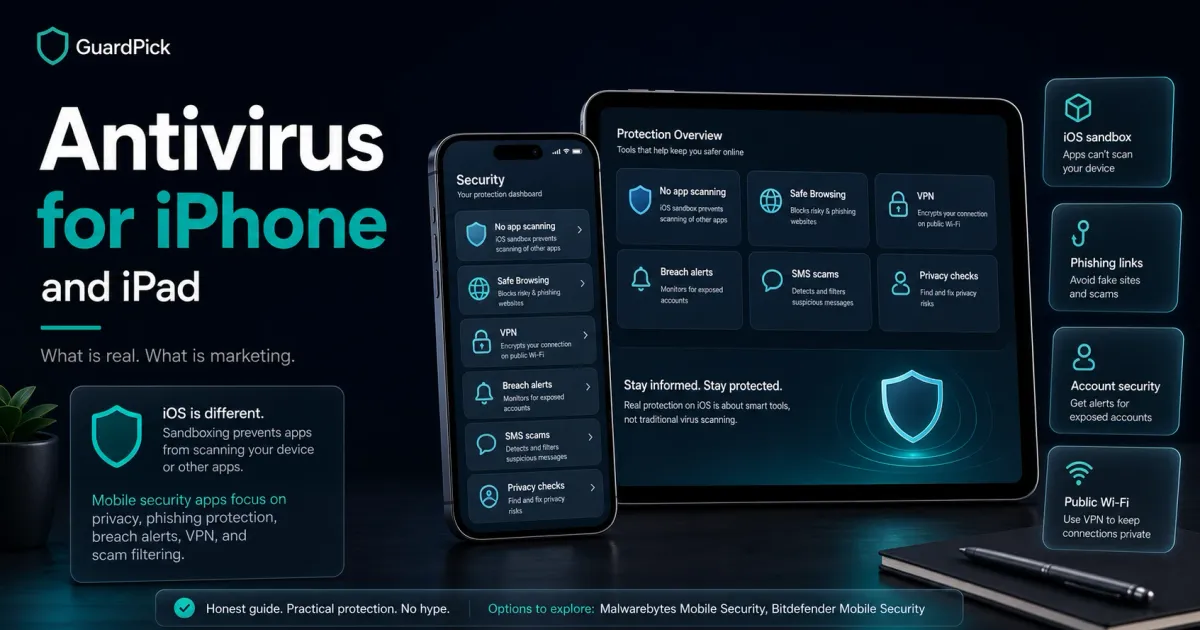
iOS sandboxes every app. This means apps cannot read files from other apps, cannot monitor other processes, and cannot access the system in ways Windows apps can. The App Store review process adds another layer.
These restrictions mean:
- No iOS security app can scan your installed apps for malware
- No iOS security app can detect a virus the way Windows antivirus does
- No iOS security app has privileged access to the file system
This is not a weakness in iOS security. It is the architecture that makes iPhone more resistant to traditional malware than Android or Windows. But it also means the “antivirus” label on App Store security apps is doing more marketing work than technical work.
What iPhone security apps actually do
Myth check
Myth vs reality
Security advice gets noisy fast. These are practical corrections for normal users, not scare tactics.
Myth
Antivirus apps for iPhone scan for viruses
Reality
iOS sandboxing prevents any app from reading another app's files or processes. Virus scanning as it works on Windows is technically impossible on a non-jailbroken iPhone.
GuardPick take
The features these apps provide are real. They just are not virus scanning.
Understand what features you are actually buying before purchasing a mobile security app.
Myth
iPhone security apps protect against all threats
Reality
The main real threats to iPhone users are phishing links, iCloud account compromise, and SMS scams. Security apps only partially address these. A password manager and 2FA address account compromise more directly.
GuardPick take
Security apps can help with phishing and some scam detection. They do not cover all iPhone threat vectors.
Use 2FA on your Apple ID and important accounts. Use a password manager. Keep iOS updated.
Myth
Your iPhone has no meaningful security risks without an app
Reality
Phishing links still work on Safari. SMS scams reach iPhones. iCloud accounts get compromised through credential stuffing. iOS protects against app-based malware, not against human-targeted attacks.
GuardPick take
iPhone security is strong for what Apple controls. The gaps are in user behavior and account security.
Be skeptical of unexpected links in SMS and email. Enable Stolen Device Protection in iOS 17+. Use Sign in with Apple where available.
When a paid iOS security app adds value
The features that genuinely help iPhone users:
Safe Browsing / Anti-phishing: Blocks known phishing websites in Safari and other browsers. This is real and useful because phishing works on iPhones.
VPN: Encrypts your internet traffic on public Wi-Fi. Useful for travelers and remote workers. Most security suites include a limited VPN.
Data breach monitoring: Alerts you when your email address or passwords appear in leaked databases. This has practical value regardless of platform.
SMS/call filtering: Blocks spam SMS and scam calls. iOS 16+ has built-in SMS filtering, but third-party apps can go further.
Best options for iPhone and iPad security
Bitdefender Mobile Security: includes VPN, Web Protection, and data breach monitoring. The iOS version is more limited than Android but covers the relevant features. Included in multi-device plans.
Malwarebytes for iOS: provides VPN, ad blocking, privacy protection, and text scam filtering. Legitimate features, clearly not traditional antivirus.
If you already have a standalone VPN subscription and use a password manager with breach monitoring (1Password, Bitwarden), the overlap with these products is significant. Avoid paying twice for the same coverage.
Check Malwarebytes pricingWhat actually protects an iPhone
Practical checklist
Real iPhone security: no antivirus required
These steps protect against the actual iPhone threat vectors more effectively than any App Store security app.
Account security (highest impact)
- Use a unique, strong password for your Apple ID. This is your most important account.
- Enable two-factor authentication on your Apple ID.
- Use a password manager for all other accounts.
- Enable Stolen Device Protection (iOS 17+) in Face ID & Passcode settings.
Phishing and scam awareness
- Be skeptical of unexpected SMS links, even from apparent known contacts.
- Apple will never call you asking for your Apple ID password or payment.
- Check URLs before entering any login credentials.
- Enable lockdown mode only if you have elevated risk. It restricts functionality significantly.
Keep iOS updated
- Enable automatic iOS updates. Security patches are the most important updates.
- Older iOS versions miss patches for known vulnerabilities.
Who should buy an iOS security app
Audience match
Match the pick to the person
The safest choice changes by habits, budget, and who manages the device.
Reader profile
Careful iPhone user with password manager and 2FA
- Recommended choice
- Nothing. You are already well protected
- Why
- You have addressed the main iPhone threat vectors. An additional security app adds minimal value.
- Avoid / watch out
- Keep iOS updated. Stay skeptical of unexpected links.
Reader profile
iPhone user who travels and uses public Wi-Fi regularly
- Recommended choice
- A standalone VPN or security app with VPN included
- Why
- VPN adds real value on public networks. Bitdefender or Malwarebytes include it.
- Avoid / watch out
- Check VPN data caps. Standalone VPN services often offer more server choice.
Reader profile
Multi-device household already paying for Bitdefender/ESET
- Recommended choice
- Add iPhone to existing multi-device plan
- Why
- No extra cost if device slots are available. Adds VPN and web protection.
- Avoid / watch out
- iOS app features are fewer than Windows version. Verify what is included.
Editorial method
How this was checked
GuardPick reviews combine a real-world Windows user angle with source checks, pricing context, and safer alternatives. We are not an antivirus lab, and we do not treat affiliate payouts as a recommendation signal.
- 01
Real-world angle
We look at whether the product makes sense for normal Windows users, not only benchmark charts.
- 02
Independent research
When lab data is used, we name the source and date instead of repeating vague marketing claims.
- 03
Pricing check
Intro prices, renewal jumps, trial limits, and cancellation friction are part of the verdict.
- 04
Alternatives considered
Windows Defender and lower-cost options stay on the table when paid software is not necessary.
Related reading: Best antivirus for Android · Best antivirus software overall