Last reviewed: June 29, 2026
GuardPick snapshot
The short version
Most Mac users asking about antivirus do not need a paid product. The question is whether your situation is in the minority that does.
- Best for
- Mac users who download from outside the App Store, share a machine with less careful users, or want a periodic second-opinion scan.
- Avoid if
- You already have macOS updated, use the App Store, and have careful download habits. Paid antivirus will not add much practical value.
- Main tradeoff
- macOS built-in security covers most users. Paid antivirus adds value in specific scenarios, not universally.
- Safer alternative
- macOS built-in XProtect + Gatekeeper + keeping macOS updated. For most users, this is sufficient.
I switched to Mac partly to stop worrying about antivirus. That was not an entirely wrong instinct, but it was not entirely right either.
Mac is not immune to malware. I have seen adware on macOS. I have seen browser hijackers. I have seen phishing attacks that worked just as well on Safari as on Chrome. The threat surface is different from Windows, not absent.
That said: most Mac users do not need paid antivirus. What they need is updated macOS, careful download habits, and an understanding of what macOS already does for them.
What macOS already does
Before recommending any paid product, it is worth being clear about what Apple provides:
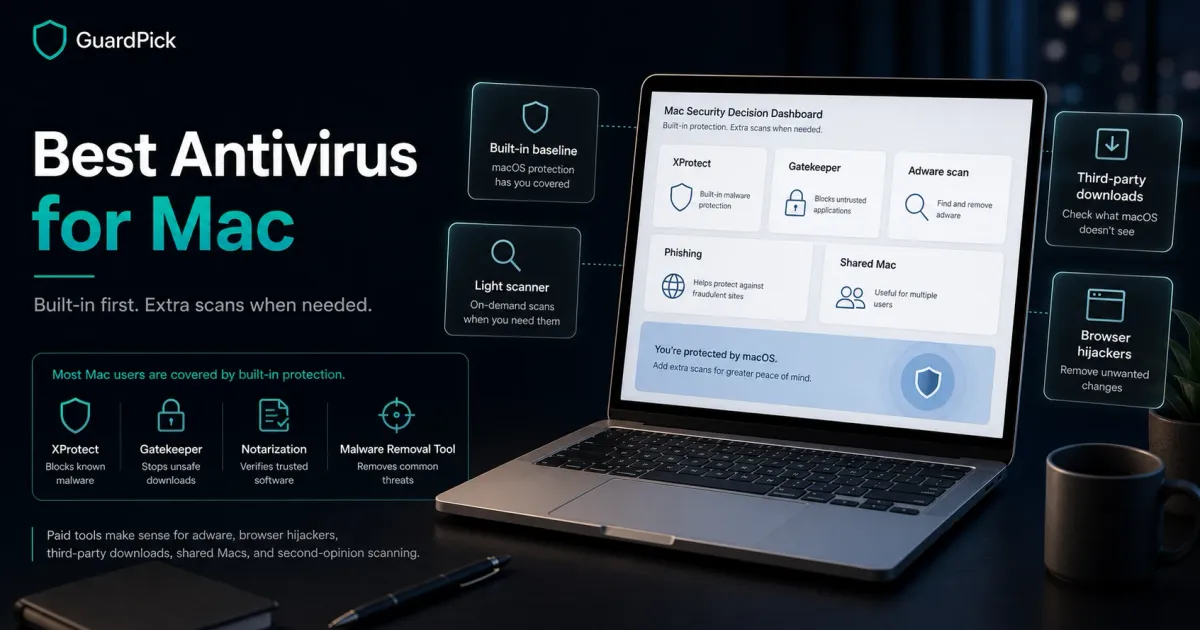
XProtect is macOS’s built-in malware signature scanner. It checks files against known malware definitions automatically, without user interaction, and is updated through system updates. It is not as comprehensive as a commercial antivirus, but it catches known threats.
Gatekeeper prevents apps that are not from identified developers or the App Store from running by default. Most accidental malware installs require actively bypassing this.
Notarization means Apple has scanned apps submitted by developers for known malware before they can be distributed outside the App Store.
Malware Removal Tool silently removes known malware even after installation.
These layers work together. For a Mac user who installs apps from the App Store or identified developers, keeps macOS updated, and does not download cracked software, this baseline is genuine protection, not a placeholder.
When paid antivirus makes sense for Mac
Decision flow
Do you need paid antivirus on your Mac?
Use this quick decision path before paying for another security suite.
- 01
Careful user, App Store and identified developers only
You download from the App Store, Apple-notarized sources, and known vendors. You keep macOS updated.
macOS built-in security is sufficient. No paid antivirus needed.
- 02
You download from outside the App Store
You regularly use software from third-party sites, torrents, or unverified sources.
Malwarebytes for Mac adds useful periodic scanning with low overhead
- 03
You already pay for multi-device Windows protection
You have a Bitdefender or ESET subscription covering multiple devices.
Add Mac to your existing plan. No need for a separate Mac-only product.
- 04
Shared Mac, multiple users with different habits
Other household members use the Mac and their download habits are less controlled.
Bitdefender for Mac or Malwarebytes Premium adds a real-time layer worth having
Best options when you do need something
Malwarebytes for Mac: best lightweight option
Malwarebytes is the most sensible paid option for Mac users who want occasional scanning without a heavy real-time layer. It is well-regarded in the Mac security community, has a minimal footprint, and its free version provides on-demand scanning without real-time protection.
The Premium version adds real-time protection and automatic scanning. It is useful for users who regularly encounter adware, browser hijackers, and potentially unwanted programs. Those are categories macOS XProtect does not address as aggressively.
The positioning: use it as a cleanup and second-opinion tool, not as your primary security layer. macOS’s own tools handle the primary layer.
Check Malwarebytes pricingBitdefender for Mac: best if you already have a multi-device plan
Bitdefender Total Security covers Mac, Windows, Android, and iOS under the same license. If you already pay for Bitdefender for Windows and have unused device slots, adding your Mac is the most cost-effective path.
As a Mac-only purchase, it is harder to justify. The macOS baseline is solid, and Bitdefender’s Mac version has fewer features than its Windows counterpart. The parental controls and multi-device management are the main reasons to consider it.
ESET for Mac: for Linux/Mac/Windows households
ESET Internet Security covers Mac and Linux alongside Windows. For households with mixed operating systems and a preference for a single subscription, ESET is a clean option. The Mac version covers real-time protection and anti-phishing.
Myths about Mac security
Myth check
Myth vs reality
Security advice gets noisy fast. These are practical corrections for normal users, not scare tactics.
Myth
Macs don't get viruses
Reality
Macs get adware, browser hijackers, stealers, and phishing attacks. Traditional Windows-style viruses are less common, but Mac-specific malware exists and has grown as Mac adoption increased.
GuardPick take
The risk is lower than Windows, not zero. Habits matter as much as software.
Keep macOS updated, download from verified sources, and be skeptical of software that asks for your admin password unexpectedly.
Myth
You need paid antivirus to be safe on Mac
Reality
macOS includes XProtect, Gatekeeper, and Notarization. For careful users who stick to the App Store and identified developers, these layers provide real protection.
GuardPick take
Paid antivirus is optional for most Mac users, not mandatory.
Enable automatic macOS updates. Download from the App Store or notarized sources. Use a password manager.
Myth
Any Windows antivirus also works on Mac
Reality
Some vendors (Bitdefender, ESET, Malwarebytes) offer Mac-specific versions or multi-device plans. Windows-only antivirus does not run on Mac. The Mac versions have different feature sets.
GuardPick take
Check whether a product includes Mac coverage before purchasing. The feature list often differs.
Verify Mac support before buying. Multi-device plans from Bitdefender or ESET are the most practical if you need both.
Who each option is for
Audience match
Match the pick to the person
The safest choice changes by habits, budget, and who manages the device.
Reader profile
Careful Mac user, App Store only
- Recommended choice
- Nothing. macOS built-in is sufficient
- Why
- XProtect, Gatekeeper, and updated macOS cover standard threats for careful users.
- Avoid / watch out
- Keep macOS updated. Do not download cracked software.
Reader profile
Mac user who downloads from third-party sources
- Recommended choice
- Malwarebytes for Mac
- Why
- Lightweight, good at catching adware and PUPs, trusted in the Mac community.
- Avoid / watch out
- Free version has no real-time protection. Premium adds that.
Reader profile
Multi-device household with Windows and Mac
- Recommended choice
- Bitdefender Total Security or ESET Internet Security
- Why
- Cover both platforms on one subscription. More cost-effective than separate products.
- Avoid / watch out
- Bitdefender Mac features are fewer than its Windows version.
Editorial method
How this was checked
GuardPick reviews combine a real-world Windows user angle with source checks, pricing context, and safer alternatives. We are not an antivirus lab, and we do not treat affiliate payouts as a recommendation signal.
- 01
Real-world angle
We look at whether the product makes sense for normal Windows users, not only benchmark charts.
- 02
Independent research
When lab data is used, we name the source and date instead of repeating vague marketing claims.
- 03
Pricing check
Intro prices, renewal jumps, trial limits, and cancellation friction are part of the verdict.
- 04
Alternatives considered
Windows Defender and lower-cost options stay on the table when paid software is not necessary.
Related reading: Best antivirus software overall · Is Windows Defender enough?